

Kodak is one of the most recognizable names in photography, but its digitizing services operate differently from its traditional film and camera products. That’s why reviewing Kodak Digitizing reviews is an important step before trusting the service with old VHS tapes, films, photos, and other irreplaceable memories.
In 2026, customers evaluating digitization services look beyond brand recognition alone. Turnaround reliability, tracking transparency, and how originals are handled now matter just as much as quality. With over 25 years of experience preserving more than 12 million family memories, Capture understands what customers expect from a digitization provider and offers this guide to help you decide if Kodak Digitizing is the right choice.
Jump To:
Understanding Kodak Digitizing’s Offerings
You want to choose the best company to digitize home movies, films, and photos, and doing so starts with understanding what your options offer. The first thing you should know is that the Kodak Digitizing Box is not a product that’s operated by Kodak itself.
Instead, the digitization orders are fulfilled through a licensed partner network associated with AMB Media, a company based in Tennessee that also operates other well-known memory conversion brands - LegacyBox and Southtree. Because of this structure, Kodak Digitizing should be viewed as a Kodak-branded service rather than an in-house Kodak operation.
This fulfillment model explains why Kodak Digitizing closely resembles other box-based services in both workflow and pricing.
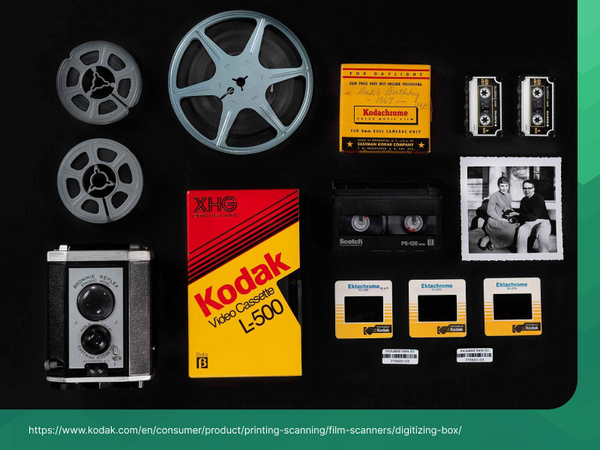
Kodak Digitizing uses a box-based system to convert tapes, film, and photos into digital files.
Kodak Digitizing Box formats and supported media
Kodak Digitizing offers similar products and services as LegacyBox, including Kodak Digitizing Boxes for 2 items, 10 items, 20 items, and 40 items. Customers mail their home videos, films, and photos using the included shipping materials, and originals are returned along with digital copies provided on DVD and USB thumb drives. Kodak Digitizing lists an estimated turnaround time of 4–6 weeks, though delays may occur during peak periods.
Kodak Digitizing excels at digitizing home movies and photos in a wide variety of formats, including:
- Videotapes: VHS, VHS-C, Hi8, Video8, MiniDV, Betamax, MicroMV, PAL-format VHS, and Digital8
- Photos: Photo prints, 35mm negatives, 35mm slides, and 126 slides
- Film: 8mm, Super 8, and 16mm film reels
- Audio: Audio cassettes and reel-to-reel recordings
While Kodak Digitizing’s website highlights detailed FAQs, satisfaction guarantees, and progress updates, the real question becomes whether Kodak Digitizing customer reviews consistently support those claims when examined across independent platforms.
What Customers Are Saying: Kodak Digitizing Reviews
Because Kodak is a global brand with many products and services, Kodak Digitizing reviews are surprisingly limited, especially when compared to other digitization providers. Most customer feedback available online comes from Kodak’s own website or from broader discussions about box-based digitization services that use similar fulfillment models.
Where Kodak Digitizing reviews can be found
At the time of writing, there are very few third-party reviews that focus exclusively on Kodak Digitizing as a service.
- Kodak Digitizing’s official website features mostly positive testimonials. These reviews often highlight ease of use, clear instructions, and satisfaction with recovered family memories.
- Yelp currently shows only one Kodak Digitizing–specific review, and it is negative. The reviewer reports a turnaround time of roughly three months, and receiving a CD and a thumb drive that were difficult to use due to unwanted image files inserted between each scanned photo.
- Outside of Kodak’s own site, most detailed feedback appears indirectly through forums, Reddit threads, and video reviews discussing box-based digitization services that operate under similar fulfillment structures.
Because of this, customers researching Kodak Digitizing often have to rely on a combination of official testimonials and broader community experiences, rather than a large pool of independent Kodak-specific reviews.
Kodak Digitizing reviews are limited on third-party sites, so most feedback appears on their own website.
What positive feedback tends to highlight
When customers report positive experiences, they most often mention:
- A simple, mail-in box process
- Clear instructions for sending materials
- Successful digitization of common formats such as VHS tapes and photo prints
- The emotional value of recovering old family memories
These comments are most commonly found in reviews hosted directly on Kodak Digitizing’s website.
Common concerns raised by customers
Critical feedback, while limited for Kodak Digitizing specifically, raises recurring themes that are relevant when evaluating box-based digitization services:
- Turnaround times extending beyond initial expectations
- Output files that require manual cleanup or reorganization
- Limited flexibility once an order is submitted
- Challenges in resolving issues through customer support
The sole Yelp review specifically describes receiving output files that were not immediately usable without manually removing hundreds of unwanted pages, along with a longer-than-expected turnaround time.
What this means for potential customers
Because independent Kodak Digitizing reviews are scarce, it’s important to evaluate the service based on more than brand recognition alone. Customers should consider:
- Whether a box-based, high-volume digitization model fits their needs
- How important file organization and output usability are for their project
- Their tolerance for turnaround variability
- The level of visibility and control they want during the digitization process
Overall, the limited independent feedback makes careful evaluation important before trusting Kodak Digitizing with irreplaceable memories.
Kodak Digitizing vs. Competitors
After browsing the reviews, it is also a good idea to compare Kodak Digitizing with other competitors like Capture, iMemories, and similar services. Kodak Digitizing uses a box-based pricing model where customers choose a prepaid kit that holds a set number of items — for example, 2-item, 10-item, 20-item, or 40-item boxes (ranging roughly from $69.99 to $1,199.99 per box).
By contrast, Capture prices digitization by individual formats, such as videotapes for about $34.98 each, film starting at $34.98 for the first 100 ft plus ~$0.30 per additional foot, and photo transfers starting at $34.98 for the first 50 photos with per-unit pricing beyond that.
This format-based approach often results in lower costs for larger or mixed collections and more predictable pricing, while services that use box-based models like Kodak Digitizing may be simpler but less efficient for high-volume orders.
If you check out other competitors, like ScanCafe or iMemories, you will see that they offer a faster turnaround than Kodak Digitizing as well. Plus, ScanCafe and iMemories reviews in general are better than Kodak Digitizing, and their pricing is closer to Capture’s low pricing structure.

Capture uses format-based pricing, which can be easier to estimate for mixed collections.
Final Verdict on Kodak Digitizing Reviews
Kodak is a well-known and reputable brand, but its digitizing services are fulfilled through a separate provider. When reviewing Kodak Digitizing reviews, some customers report positive experiences, highlighting acceptable quality, an easy ordering process, and a professional-looking website.
At the same time, recurring concerns appear in customer feedback, including higher-than-expected costs, turnaround times that extend beyond initial estimates, and occasional issues with how original materials or output files are handled. For families preserving irreplaceable memories, these factors are important to weigh carefully.
While DIY digitization options may seem appealing, they often come with quality limitations and added risk. Capture offers a satisfaction guarantee, format-based pricing, and industry-leading security designed to protect priceless memories from start to finish.


